Closeby Review
Reviewed on
Our rating: 
Closeby is a low-cost store locator that launched in 2018 and relaunched as "Closeby 2.0" in 2024. It's a small operation: the company's own blog says the owner answers support emails personally. Its Shopify app is rated 4.9 from 19 reviews, and it also has an app on the Wix App Market.
The appeal is easy to state. Closeby is free for up to 5 locations, costs $19.99 a month for 10,000, includes its own maps with no API key, and looks good out of the box. What you give up are the deeper features found in bigger locators.
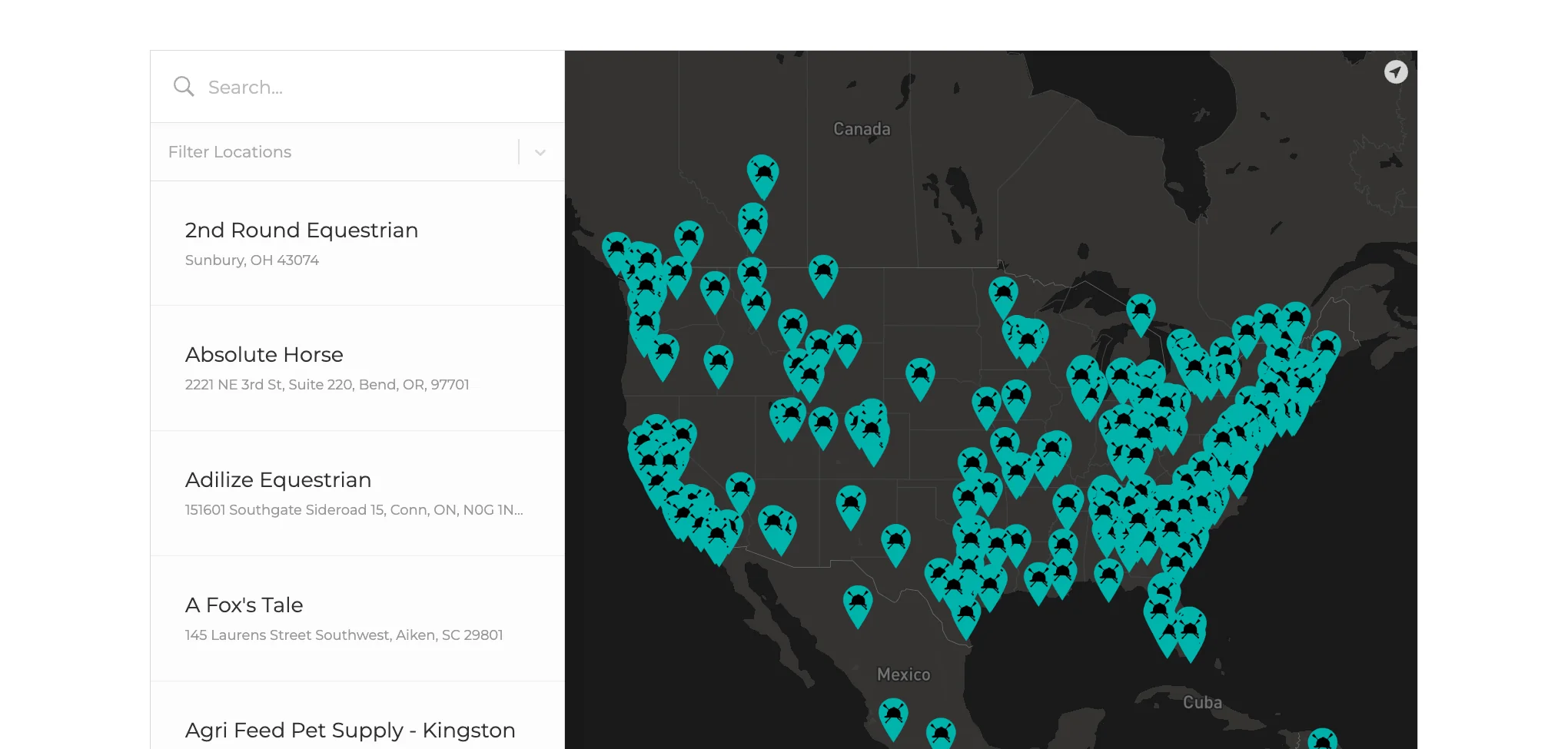
A Closeby locator with a dark theme and custom pins on a customer's Shopify store Source: huntseatpaperco.com
Closeby's "native" map themes are built on OpenStreetMap data and served by Closeby itself. They need no map account, no API key and carry no per-view fees, and no map-view cap is published. (Its terms do allow it to act on accounts whose usage is far above average.) If you'd prefer Mapbox styling, you can use Mapbox themes or your own Mapbox Studio style with your own Mapbox token.
There's no Google Maps option. Closeby does use Google behind the scenes to look up addresses, and you can drag a pin to correct its position. Marker clustering, address autocomplete with country restrictions, "start at my location" and directions links to Google or Apple Maps are all included.
A warning about the documentation: several older help articles still say a Mapbox token is required and describe overage fees. Those describe the previous version.
Language support is limited. A "Map Label Language" setting changes the place names on Closeby's own maps, with options including French, German, Spanish, Italian, Japanese and Korean. The interface text isn't translated for you, but a "Language & Text" tab lets you reword each piece of text by hand.
That gives you one language per map. Closeby's help centre says plainly that it doesn't support a complete language configuration, so a site that serves several languages would need a separate map for each.
Filtering is based on categories. Each location can have several, visitors can pick one or more from a filter bar, and each category can have its own pin colour, pin image and default photo. You can also preset a category in the embed code, to show only delivery locations on one page, for example.
There's a single filter group, with no second dimension such as "products" alongside "store type". Visitors can't choose a search radius themselves; you set the search area and the maximum number of results (up to 10,000) in the settings.
Closeby reports searches and location views in its dashboard, though it publishes little detail about the reports. More usefully, you can enter a Google Analytics ID and Closeby will send events for searches and for clicks on directions, phone, website and email links, so you can track locator activity alongside the rest of your site.
Imports are CSV only. The file has to match Closeby's template exactly, as there's no column-mapping step, and the help centre warns that imports of more than about 5,000 rows can time out. There's no duplicate detection: rows with an ID update existing locations and rows without one are added.
Google Sheets sync is included on every plan. You sign in with Google and Closeby creates the sheet for you. It's limited to 2,500 locations and doesn't carry images. Closeby's pages disagree on how often it syncs (hourly in one place, daily in another), but there's a "sync now" button either way.
Design is Closeby's strong suit. There are 22 themes, three list layouts (text, image and two-column image), two mobile layouts, a choice of fonts and button shapes, and a set of colour pickers for finer control. Pins can be a standard pin, a circle or your own image.
The locator can sit in the page, open as an overlay from a floating button, or be embedded as a plain iframe (the only option on Wix). There's no documented custom CSS editor for the locator itself. Location details, with photos, hours and buttons, open in a panel inside the widget; there are no separate location pages.
Support is by email or a request form, with no phone or chat. Reviews often praise the help they received, naming the people involved, but this is a very small team. One Shopify reviewer got an auto-reply quoting a typical response time of 5 business days, though their issue was later resolved.
The documentation needs attention. Many of the 38 help articles date from 2018 to 2024 and describe old pricing and setup, and the new documentation page still has placeholder text in several sections.
Closeby has no public API, webhooks or JavaScript events. The only developer options are parameters on the embed code (to preset a category, open a specific location or set the height) and a link that opens the overlay.
- Delivery buttons - link each location to UberEats, DoorDash, Grubhub or Postmates.
- Custom buttons - add your own button text and link to a location.
- Opening hours - per-day hours with split shifts and "open 24 hours".
- Photos - several images per location.
The embed shows a small "Powered by Closeby" logo, and we couldn't find a setting to remove it.
| Plan | Monthly | Yearly | Locations |
|---|---|---|---|
| Free | $0 | $0 | 5 |
| Paid, first tier | $9.99 | $99.99 | 100 |
| Paid, second tier | $19.99 | $199.99 | 10,000 |
Every plan has every feature, including Google Sheets sync and analytics, which makes Closeby's pricing the simplest of any locator we cover. There's no published plan above 10,000 locations.
On Shopify, Closeby has 16 five-star and 3 four-star reviews. Reviewers like the design, the easy setup, Google Sheets sync and the price. Criticisms include the slow-support auto-reply mentioned above, difficulty embedding it in a Shopify page, and the size of the free plan:
"5 locations for free is not enough" - Apostrophe Paris, Shopify App Store
On the Wix App Market it's rated 4.3 from 20 reviews, with a handful of low ratings.
Pros
- 10,000 locations for $19.99 a month
- Maps included, with no API key or per-view fees
- Every feature on every plan, including Sheets sync
- Attractive themes and layouts
- Free plan for up to 5 locations
Cons
- No Google Maps option
- One language per map
- CSV-only imports with a fixed template and no duplicate detection
- No API or location pages
- Email-only support from a very small team; outdated help pages
Closeby gives you a good-looking locator for very little money, and its included maps remove the most confusing part of setting one up. For a single-language site with a simple list of locations, it's an easy recommendation on value alone.
Its limits are equally clear. If you need Google Maps, several languages, an API, Excel imports or guaranteed quick support, Closeby isn't built for that, and a locator with a larger team behind it will suit you better.