Stockist Review
Reviewed on
Our rating: 
Stockist is a hosted store locator aimed at brands that sell through retailers and want a "where to buy" page on their website. It's run by Nitra LLC in Seattle and has been on the Shopify App Store since June 2016, where it holds a 5.0 rating from 353 reviews, the best record of any store locator there.
The pitch is simplicity: one clean layout with a search bar, a results list and a map, installed by pasting a snippet into your site. Stockist doesn't try to match the feature lists of bigger platforms. What it does offer is a product with few moving parts and support that customers go out of their way to praise.
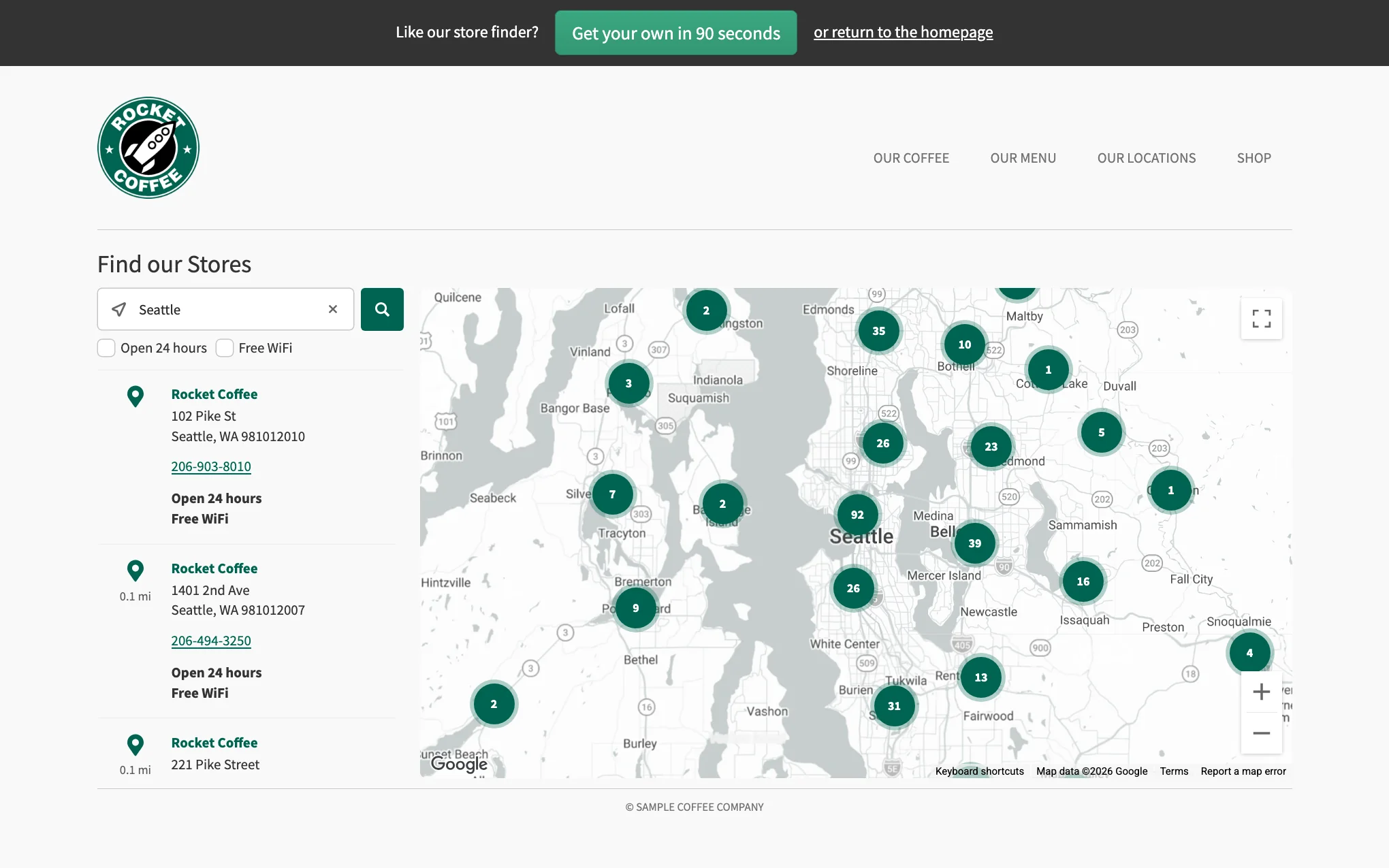
Stockist's demo locator after a search for Seattle Source: stockist.co
Stockist supports Google Maps and Mapbox, and you can switch between them in the settings without losing your listings. Either way you need your own account and key; Stockist doesn't include map usage in its plans. It generally recommends Mapbox, whose free allowance covers roughly 10,000 map views a month, and says that 99% of its clients on Google stay within Google's free tier. If you go over, the map provider bills you directly.
Store addresses are geocoded automatically when you import them, and you can supply latitude and longitude columns to skip the lookup. Imports flag pins that couldn't be found or are only approximate. For visitors there's address autocomplete (which you can switch off to reduce key usage), a Google Maps directions link on every listing, and automatic geolocation: by IP address on desktop and by GPS on mobile.
The number of display languages depends on your plan: 1 on Basic, 2 on Plus and 4 on Premium. Translations are entered by hand under Settings > Text & translations, and cover interface messages, button labels, filter names and custom field names. Store details such as names, addresses and notes can't be translated.
On Shopify the locator follows the storefront language automatically. On other platforms, language switching needs to be configured for your site with help from Stockist's support team.
Filters are yes/no tags, and you can have as many as you like on every plan. A filter might be a product line you carry, a service or a store type. They appear as checkboxes or, for longer lists, in a dropdown panel, and you choose whether selecting several means "all of these" or "any of these".
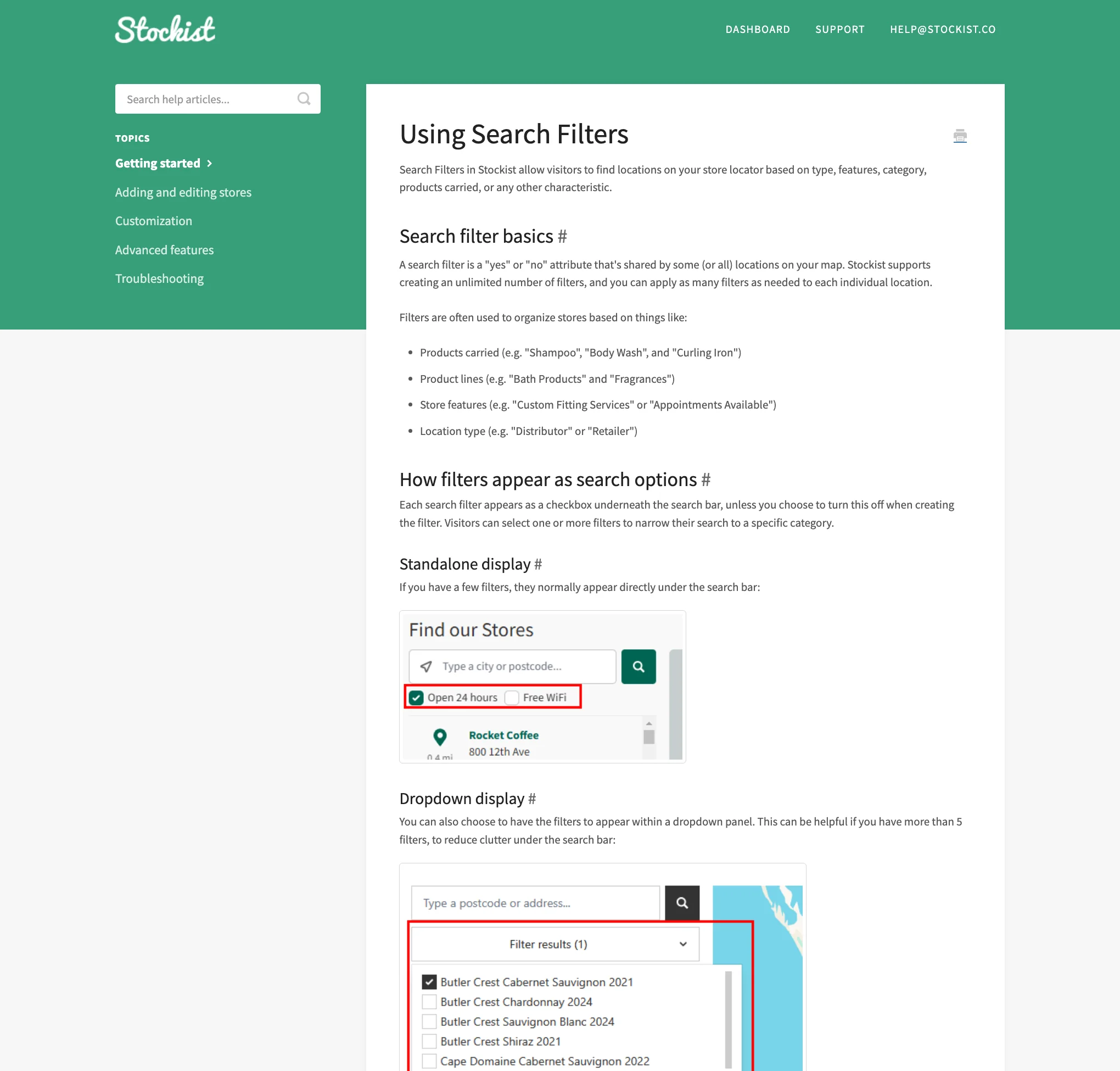
Stockist's help guide showing checkbox and dropdown filter displays Source: help.stockist.co
You can link to the locator with a search or filter pre-applied using URL parameters, which is handy for "find a stockist" links on product pages. Each filter can also have its own map pin style. There's no separate category or product-finder system; everything is a tag. A map restricted to one category on a separate page is possible, but support has to set it up.
Search radius can be automatic, fixed, or chosen by the visitor from a list of distances. Searching by store name is off by default and is also enabled by support.
Search analytics start on the $20 Plus plan. You get colour-coded heatmaps of where people are searching, breakdowns by city and country, and a download of the raw search data, including which filters were used.
Click tracking isn't shown in the dashboard. Instead, Stockist can send search and click events to Google Tag Manager on Plus and above, once support enables it. There's no direct Google Analytics integration.
Every plan includes spreadsheet import and export. Imports are CSV files with a column-matching step, so you don't have to use Stockist's template, although the documentation tells you to convert Excel files to CSV first. Imported stores stay unpublished until you've checked them, and a "complete list" option replaces your whole store list with no downtime.
Google Sheets sync needs the $40 Premium plan. It connects through a view-only share link, so you don't grant Stockist access to your Google account. The sheet is checked once a day on the days you choose, with a "Sync now" button for anything urgent.
The gap here is duplicate detection: none is documented, and a sync adds stores alongside existing ones, so duplicates are possible if you mix manual entries and synced ones.
There's one layout, with a handful of options: list on the left or right, search bar above the list or across the top, a feature colour and the width at which it switches to a stacked mobile layout. The locator inherits your site's fonts and text colours, which helps it blend in, and you can add custom CSS. Stockist's support will help with moderate CSS changes.
Map colour themes need the Plus plan or higher. Pins can be recoloured or replaced with your own image on any plan.
Support is by email and through the dashboard; there's no phone number or live chat. Stockist's terms commit to responding within two business days, but the reviews suggest it's usually much faster. Staff are thanked by name in review after review, and one reviewer noted that Stockist spotted a problem with their Google key before they did.
The help centre has around 70 articles, including install guides for Shopify, WordPress, Squarespace, Wix, BigCommerce and several smaller platforms.
Stockist's help pages mention an API for building fully custom layouts, but there's no public API documentation, and we couldn't find details of what it covers or which plans include it. The documented developer hooks are the URL parameters and the Google Tag Manager events. If API access matters to you, ask Stockist before you commit.
- Custom fields - add your own text or link fields to each store.
- Store images and notes - each listing can show a logo or photo and a note.
- Priority ordering - push chosen stores to the top of results.
- Per-filter pins - show a different pin for, say, flagship stores.
Not offered: individual store pages for SEO, lead or "request a stockist" forms, structured opening hours, and multiple user logins on accounts created directly rather than through Shopify.
| Plan | Monthly | Locations | Languages | Adds |
|---|---|---|---|---|
| Basic | $10 | 100 | 1 | Import/export, unlimited filters, custom pins |
| Plus | $20 | 500 | 2 | Search analytics, map themes |
| Premium | $40 | 2,000 | 4 | Google Sheets sync, no "powered by" link |
Annual billing takes 20% off. There's a 14-day free trial and no free plan. Above 2,000 locations Stockist quotes individually and says it can support up to 100,000 stores per map. Remember to allow for possible map provider charges on top if your locator is busy.
Stockist's 353 Shopify reviews are almost uniformly five-star. The recurring themes are fast, hands-on support, easy setup and simple bulk uploads. Named brands among the reviewers include Big Green Egg Australia, 99 Bikes and Rains.
The only recurring complaint is price relative to features. The single one-star review, from January 2026, put it this way:
"Way, way, way to pricey for what you get." - BabyMocs, Shopify App Store
Pros
- Outstanding support reputation
- Quick to set up and easy to maintain
- Unlimited filters with per-filter pins on every plan
- Low entry price and a view-only link for Google Sheets sync
Cons
- Needs your own Google Maps or Mapbox key
- Analytics, themes and Sheets sync are on higher plans
- No duplicate detection; Sheets sync runs once a day
- Standard plans stop at 2,000 locations
- No public API documentation or store pages
Stockist is a simple product done well. If you're a brand with a few hundred stockists, particularly on Shopify, it will have you up and running quickly, and you're unlikely to find better support.
Its limits appear as you grow. Analytics and Google Sheets sync cost extra, there's no duplicate detection, map usage is on your own account, and past 2,000 locations you're into custom pricing. Businesses that need an API, store pages or included mapping should compare the alternatives.